
When you open Claude AI, you’re immediately asked to choose a model. Most beginners ignore this and stick with whatever’s selected by default. That’s actually fine as a starting point — but understanding what each model does will make you significantly more effective.
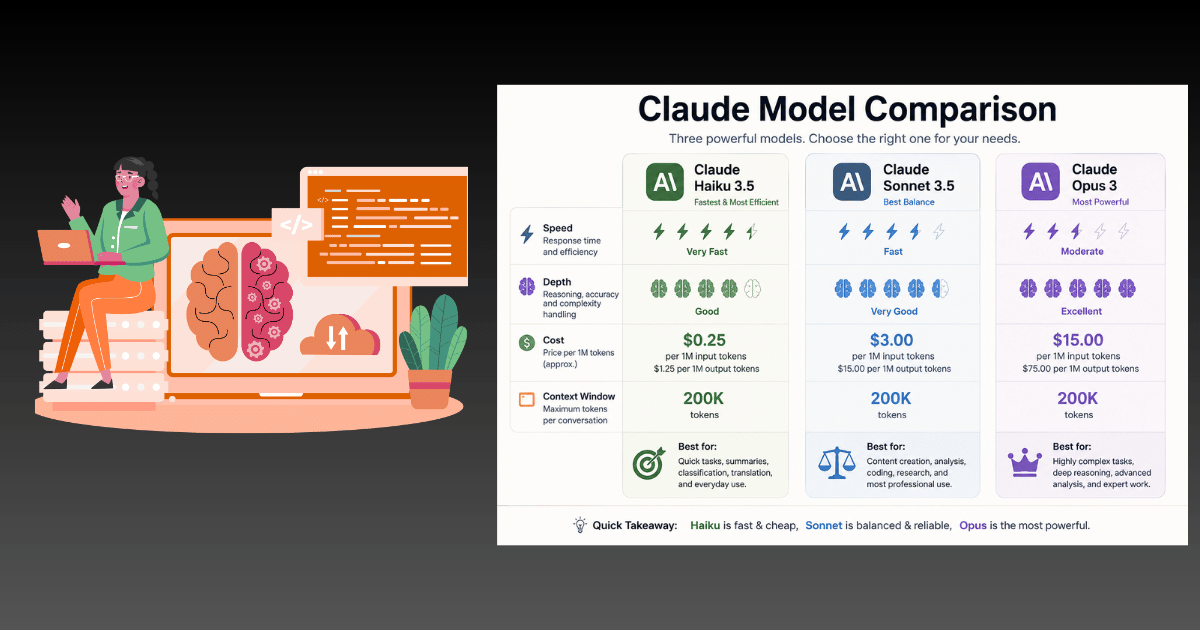
The Three Claude Models at a Glance
| Model | Speed | Depth | Cost | Best For |
|---|---|---|---|---|
| Haiku 4.5 | ⚡ Fastest | Basic | Lowest | Quick tasks, reformatting |
| Sonnet 4.6 | Fast | Strong | Mid | Most everyday work |
| Opus 4.6 | Slower | Deepest | Highest | Complex reasoning, architecture |
Claude Haiku 4.5: Your Speed Layer
Haiku is built for volume and speed. It handles simple, well-defined tasks quickly and cheaply.
Use Haiku for:
- Reformatting text (turning bullets into a table, changing tone)
- Basic summarization of short content
- Quick factual questions with clear answers
- High-volume batch tasks where you need fast throughput
Don’t use Haiku for:
- Anything requiring nuanced judgment
- Complex writing that needs to sound natural
- Code debugging or architecture decisions
In the web interface, you’ll need to manually switch to Haiku using the model selector at the top of the chat. It won’t be suggested automatically.
Claude Sonnet 4.6: Your Daily Workhorse
Sonnet 4.6 handles the vast majority of real-world tasks. It’s fast, deeply capable, and costs significantly less than Opus.
Many developers who used to reach for Opus by default have switched to Sonnet 4.6 — it’s that good.
Use Sonnet for:
- Writing (articles, emails, scripts, social content)
- Coding and debugging (handles most daily programming tasks)
- Research and analysis
- Brainstorming and ideation
- Document creation and editing
The 90% rule: Sonnet handles roughly 90% of everything most people need from an AI assistant. If you’re unsure which model to use, start here.
Claude Opus 4.6: Your Expert Consultant
Opus is the senior architect you bring in when Sonnet isn’t enough.
It supports the 1 million token context window, handles agent team workflows, and excels at the kinds of problems that genuinely require sustained, multi-layered reasoning.
Use Opus for:
- Gnarly debugging sessions where other models give up
- System architecture and complex refactoring
- Multi-step analysis holding many variables at once
- Tasks requiring massive context (entire codebases, document collections)
- Strategic decisions with significant consequences
Don’t waste Opus on:
- Simple emails or content summaries
- Basic rewrites or formatting tasks
- Quick questions you know Sonnet can answer
Pro plan users get a generous Sonnet limit and some Opus usage each billing period. Burning Opus limits on basic tasks is one of the most common mistakes new users make.
The Decision Framework
Start with Sonnet 4.6
       │
       ├── Answer is good enough? ✅ Done
       │
       ├── Too shallow / missing nuance?
       │      └── Switch to Opus 4.6
       │
       └── Just need something reformatted quickly?
              └── Switch to Haiku 4.5
This framework works for 99% of use cases.
Context Windows: Why Opus and Sonnet Now Dominate
Both Opus and Sonnet 4.6 support a 1 million token context window — roughly 750,000 words. This means you can upload entire books, codebases, or a year of emails into a single conversation.
Previous models dropped to ~18% accuracy when context got long. Claude 4.6 maintains 76% accuracy even at the far edges of that million token window. That’s what makes long-document analysis finally reliable.
Summary
Most users should spend the majority of their time in Sonnet 4.6, escalate to Opus for hard problems, and drop to Haiku for bulk formatting. Stick to this and you’ll get more value from your Claude subscription while preserving your usage limits for the tasks that actually need them.
👉 Back to the full guide: How to Use Claude AI: The Complete Beginner’s Guide